
Laptop Cooling Pads That Help Gaming Laptops Run Cooler
Laptop cooling pads that improve airflow, reduce heat, and help gaming laptops perform better during long sessions.
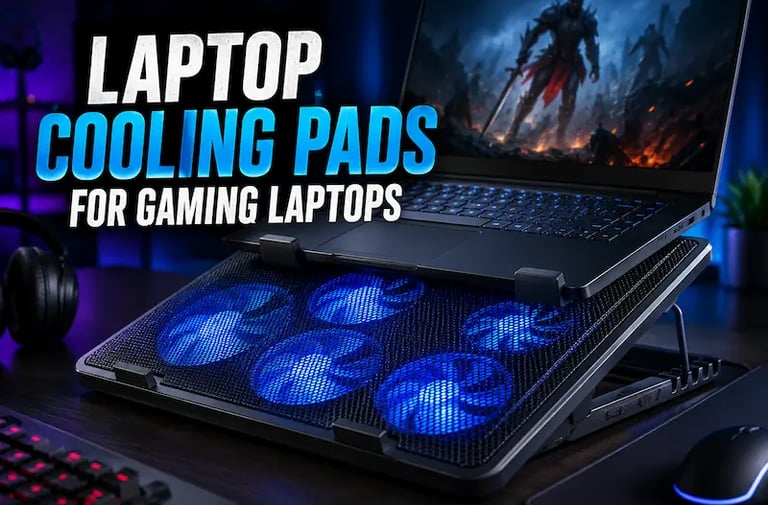
Laptop Cooling Pads That Help Gaming Laptops Run Cooler
Gaming laptops deliver powerful performance in compact designs, but heat remains one of the biggest problems for gamers, creators, and heavy laptop users. High temperatures can reduce performance, increase fan noise, and make long gaming sessions uncomfortable.
Laptop cooling pads are one of the simplest ways to improve airflow and help gaming laptops stay cooler during demanding workloads. Modern cooling pads now offer multiple high-speed fans, adjustable height settings, RGB lighting, USB hubs, and ergonomic designs built specifically for gaming and productivity setups.
Whether you play competitive games, edit videos, stream content, or simply use your laptop for long hours, a quality cooling pad can improve comfort and help maintain more stable performance.
These laptop cooling pads are some of the most popular options currently available for gaming laptops.
Why Gaming Laptops Need Cooling Pads
Gaming laptops generate significant heat because powerful CPUs and GPUs operate inside compact chassis designs with limited airflow.
Over time, excessive heat can lead to:
thermal throttling
louder fans
reduced performance
uncomfortable keyboard temperatures
shorter hardware lifespan
Laptop cooling pads improve airflow underneath the laptop, helping internal cooling systems work more efficiently.
Many users also prefer cooling pads because they improve typing angles and create more ergonomic desk setups.
For even better ergonomics, many users combine cooling pads with adjustable aluminum laptop stands and external productivity accessories.
What to Look for in a Laptop Cooling Pad
Before choosing a cooling pad, there are several important features to consider.
Fan Configuration
Cooling pads with multiple fans usually provide better airflow coverage for larger gaming laptops.
Some models focus on:
quiet operation
stronger airflow
RGB aesthetics
larger cooling zones
depending on the intended use.
Adjustable Height
Adjustable stands help improve:
viewing angles
typing comfort
posture
airflow beneath the laptop
This is especially useful for long gaming or work sessions.
Some remote workers also use portable monitors alongside cooling pads to build more productive multi-screen laptop setups.
Laptop Compatibility
Not all cooling pads support the same laptop sizes. Larger gaming laptops often require wider cooling surfaces and stronger airflow systems.
Portability
Slim cooling pads work well for:
travel
school
coffee shops
hybrid work setups
while larger RGB cooling pads are usually designed for permanent gaming desks.
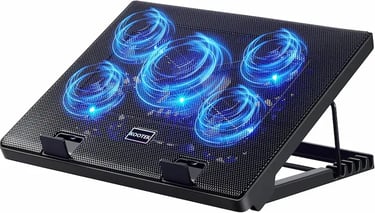
1. Kootek Laptop Cooling Pad
The Kootek Laptop Cooling Pad is one of the most balanced options for users who want strong airflow without excessive noise.
Its five-fan configuration helps distribute cooling across larger laptop surfaces while maintaining relatively quiet operation. The adjustable stand also improves comfort during gaming, streaming, or productivity sessions.
Because it supports laptops between 12 and 17 inches, it works well for both gaming laptops and standard productivity devices.
Best Features
Five quiet cooling fans
Adjustable height stand
Strong airflow coverage
Gaming-friendly design
Good compatibility range
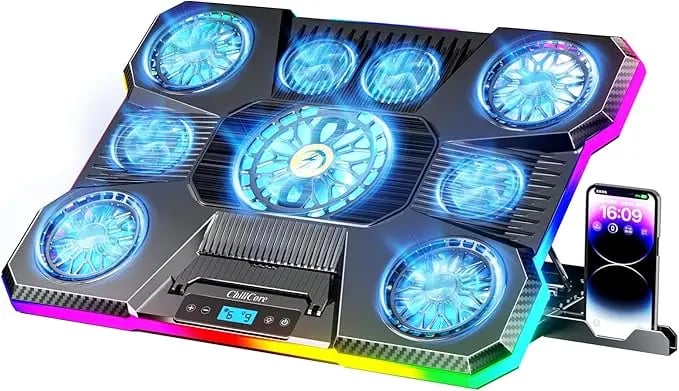
2. ChillCore RGB Laptop Cooling Pad
The ChillCore cooling pad is designed primarily for larger gaming laptops and RGB-focused gaming setups.
Its aggressive design includes nine cooling fans and colorful RGB lighting that fits modern gaming desks and streaming environments.
The larger cooling surface makes it especially useful for high-performance gaming laptops that generate significant heat during extended sessions.
Best Features
Nine cooling fans
RGB lighting system
Large laptop support
Multiple height adjustments
Strong airflow performance
3. Havit HV-F2056 Laptop Cooling Pad
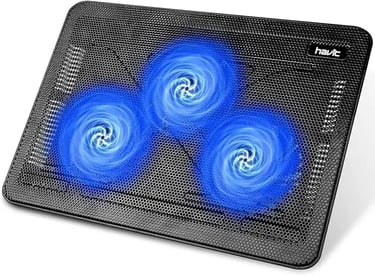
The havit HV-F2056 focuses heavily on portability and simplicity.
Unlike larger RGB cooling pads, this model uses a slim and lightweight structure that fits easily inside backpacks and travel bags.
Its three-fan setup still provides noticeable airflow improvements while remaining quieter and more portable than bulkier gaming cooling pads.
For users who travel frequently or move between workspaces, this model offers a practical balance between cooling and portability.
Best Features
Slim lightweight design
Portable travel-friendly structure
Quiet cooling fans
Adjustable viewing angles
USB-powered setup
Best Laptop Cooling Pad for Gaming
For dedicated gaming setups, the ChillCore RGB cooling pad stands out because of its aggressive airflow system and larger cooling surface.
Its multiple fans and RGB aesthetics make it especially appealing for:
gaming desks
streaming setups
high-performance gaming laptops
long gaming sessions
where heat management becomes more important.
Best Portable Laptop Cooling Pad
Users who prioritize portability will likely prefer the havit HV-F2056.
Its slim profile and lightweight construction make it much easier to carry compared to larger RGB-focused cooling pads.
This makes it ideal for:
students
remote workers
hybrid work setups
mobile gaming users
who need better cooling without adding excessive bulk.
Final Thoughts
Laptop cooling pads have become one of the most practical accessories for gaming laptops and heavy laptop users.
Whether you need better airflow for gaming, improved ergonomics for productivity, or a portable cooling solution for travel, modern cooling pads now offer a wide range of designs for different needs and desk setups.
Choosing the right cooling pad mainly depends on your laptop size, portability preferences, and how aggressively you need to manage heat during long gaming or work sessions.
Comparison Table
Related Articles :
Smart gadgets, modern technology, productivity tools, and practical buying guides for everyday life. Discover tech reviews, smart accessories, consumer electronics, and curated recommendations through Digiwanta.
Contact
Affiliate Disclosure:
Digiwanta may earn commissions from qualifying purchases through affiliate partnerships.
Quick links